
开源POC框架学习2 — POC-T篇
1. 概要
ps: 这篇写的比较水, emm…
学习大概分为三个阶段:
- 熟悉项目,基本的使用、POC的编写
- 熟悉代码逻辑,理清大致的设计思路
- 尝试将代码迁移到Python3,移除gevent依赖(下一篇,等待迁移完,写这一部分)
2. 基本的使用
2.1. 项目结构
├─data  // 数据存放目录,项目默认带了 pass100、pass1000、user-agents
├─doc   // 文档与版权声明
├─lib   // 项目代码
│  ├─api // 搜索引擎接口
│  │  ├─fofa
│  │  ├─google
│  │  ├─shodan
│  │  └─zoomeye
│  ├─controller // api engine loder
│  ├─core  // 核心代码
│  ├─parse // 命令行参数解析
│  └─utils // 一些工具函数
├─output // 执行结果会保存到这个路径下
├─plugin // 一些独立的小功能
├─script // 存放poc的目录
└─thirdparty  // 使用的第三方依赖库
    ├─ansistrm
    ├─colorama
    ├─httplib2
    ├─IPy
    ├─odict
    └─termcolor
2.2. 快速入门
参考资料:
git clone https://github.com/Xyntax/POC-T
pip install -r requirement.txt
python POC-T.py
usage: python POC-T.py -s bingc -aZ "port:8080"

powered by cdxy <mail:[email protected]>

ENGINE:
  -eT                   Multi-Threaded engine (default choice)
  -eG                   Gevent engine (single-threaded with asynchronous)
  -t NUM                num of threads/concurrent, 10 by default

SCRIPT:
  -s NAME               load script by name (-s jboss-rce) or path (-s
                        ./script/jboss.py)

TARGET:
  -iS TARGET            scan a single target (e.g. www.wooyun.org)
  -iF FILE              load targets from targetFile (e.g.
                        ./data/wooyun_domain)
  -iA START-END         generate array from int(start) to int(end) (e.g.
                        1-100)
  -iN IP/MASK           generate IP from IP/MASK. (e.g. 127.0.0.0/24)

API:
  -aZ DORK, --zoomeye DORK
                        ZoomEye dork (e.g. "zabbix port:8080")
  -aS DORK, --shodan DORK
                        Shodan dork.
  -aG DORK, --google DORK
                        Google dork (e.g. "inurl:admin.php")
  -aF DORK, --fofa DORK
                        FoFa dork (e.g. "banner=users && protocol=ftp")
  --limit NUM           Maximum searching results (default:10)
  --offset OFFSET       Search offset to begin getting results from
                        (default:0)
  --search-type TYPE    [ZoomEye] search type used in ZoomEye API, web or host
                        (default:host)
  --gproxy PROXY        [Google] Use proxy for Google (e.g. "sock5 127.0.0.1
                        7070" or "http 127.0.0.1 1894"

OUTPUT:
  -o FILE               output file path&name. default in ./output/
  -oF, --no-file        disable file output
  -oS, --no-screen      disable screen output

MISC:
  --single              exit after finding the first victim/password.
  --show                show available script names in ./script/ and exit
  --browser             Open notepad or web browser to view report after task
                        finished.

SYSTEM:
  -v, --version         show program's version number and exit
  -h, --help            show this help message and exit
  --update              update POC-T from github source
eg. 测试是否存在redis未授权访问
python POC-T.py -s redis-unauth.py -aS "port:6379 country:cn"

                                             __/
    ____     ____     _____           ______/ __/
   / __ \   / __ \   / ___/   ____   /__  __/_/
  / /_/ /  / /_/ /  / /___   /___/     / /
 / /___/   \____/   \____/            / /
/_/                                  /_/
    { Version 2.0.5 by cdxy mail:[email protected] }

[+] Load custom script: redis-unauth.py
[+] Initialize targets...
[*] Activate Shodan API
[*] Trying to login with credentials in config file: C:\Users\t25\Desktop\POC-3T\toolkit.conf.
[!] Automatic authorization failed.
[*] Please input your Shodan API Key (https://account.shodan.io/).
API KEY > A3JeaQIxxxxxxxxxxxxxxxxkssMSDzZ
[*] Available Shodan query credits: 99
[+] Total: 10
[+] Set the number of concurrent: 10
49.233.145.209:6379
118.25.185.46:6379
180.105.236.159:6379
2.3. POC的编写
poc-t对poc格式的要求较少,函数名称为poc,参数str,返回值为true/false
示例poc: reids未授权访问 redis-unauth.py
"""
redis未授权访问PoC
  (host2IP函数使用场景示例)

Usage
  python POC-T.py -s redis-unauth.py -aZ "port:6379 country:cn"

"""

import socket
from plugin.util import host2IP

// poc脚本里只需要实现poc()函数
def poc(url):
    url = host2IP(url)  # 自动判断输入格式,并将URL转为IP
    port = int(url.split(':')[-1]) if ':' in url else 6379  # 不指定端口则为默认端口
    payload = '\x2a\x31\x0d\x0a\x24\x34\x0d\x0a\x69\x6e\x66\x6f\x0d\x0a'
    s = socket.socket()
    socket.setdefaulttimeout(10)
    try:
        host = url.split(':')[0]
        s.connect((host, port))
        s.send(payload)
        recvdata = s.recv(1024)
        s.close()
        if recvdata and 'redis_version' in recvdata:
            return True
    except Exception:
        pass
    return False
3. 核心代码逻辑
参考doc目录下的usage.png
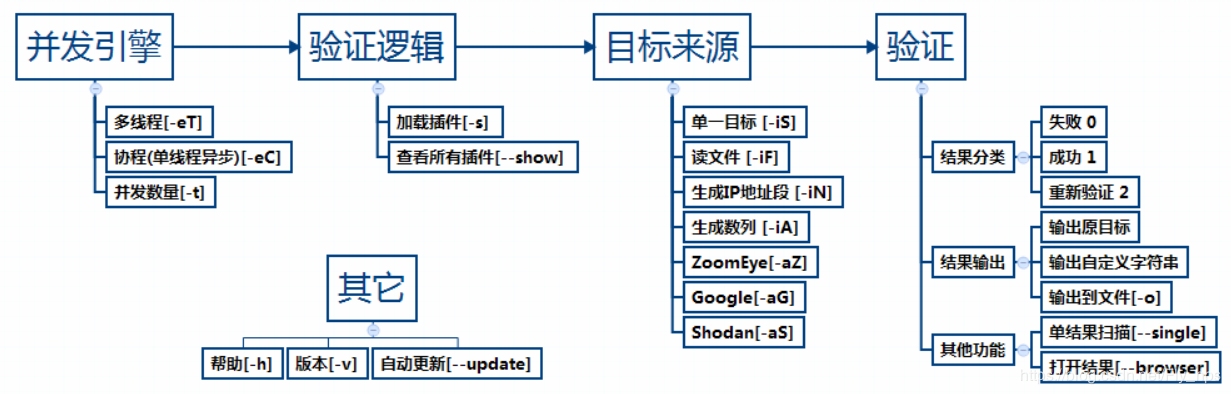
注:图中异步并发的参数已改为-eG
主要学习启动的并发引擎、插件加载等部分
3.1. main函数
POC-T.py文件很简单,先检查下python版本,然后调用lib.cli中的main()
from lib.utils import versioncheck  # this has to be the first non-standard import
from lib.cli import main

if __name__ == '__main__':
    main()
lib.cli 中的main(), 先解析命令行参数,然后根据命令行参数进行初始化设置,然后加载poc、目标,并发执行poc,输出执行结果。
def main():
    """
    Main function of POC-T when running from command line.
    """
    try:
        paths.ROOT_PATH = os.path.dirname(os.path.dirname(os.path.realpath(__file__)))
        try:
            os.path.isdir(paths.ROOT_PATH)
        except UnicodeEncodeError:
            errMsg = "your system does not properly handle non-ASCII paths. "
            errMsg += "Please move the project root directory to another location"
            logger.error(errMsg)
            raise SystemExit

        setPaths() # 设置全局变量paths(一个继承自dict的类的实例对象)

        cmdLineOptions.update(cmdLineParser().__dict__) # 使用argpars解析命令行参数,并设置cmdLineOptions(同样是一个继承自dict的类的实例对象))
        initOptions(cmdLineOptions) # 根据传入的命令行参数,进行初始化操作

        if IS_WIN:
            winowsColorInit() # windows下终端颜色初始化
        banner() # 打印banner

        loadModule() # 加载poc
        loadPayloads() # 加载目标

        run() # 初始化并发引擎,并进行扫描

        if conf.OPEN_BROWSER:
            openBrowser()

        systemQuit(EXIT_STATUS.SYSETM_EXIT)
3.2. 加载poc
loadModule() 加载poc,通过poc文件名使用imp模块加载对应的模块。核心就两个函数imp.find_module()、imp.load_module(),poc对象被放到的全局变量th.module_obj中。
def loadModule():
    _name = conf.MODULE_NAME
    msg = 'Load custom script: %s' % _name
    logger.success(msg)

    fp, pathname, description = imp.find_module(os.path.splitext(_name)[0], [paths.SCRIPT_PATH]) # 查找module
    try:
        th.module_obj = imp.load_module("_", fp, pathname, description) # 加载modul
        for each in ESSENTIAL_MODULE_METHODS:
            if not hasattr(th.module_obj, each):
                errorMsg = "Can't find essential method:'%s()' in current script,Please modify your script/PoC."
                sys.exit(logger.error(errorMsg))
    except ImportError, e:
        errorMsg = "Your current scipt [%s.py] caused this exception\n%s\n%s" \
                   % (_name, '[Error Msg]: ' + str(e), 'Maybe you can download this module from pip or easy_install')
        sys.exit(logger.error(errorMsg))
3.3. 加载扫描目标
loadPayloads() 支持通过多种方式加载目标 int_mode()、file_mode()、net_mode()、single_target_mode()、api_mode()。解析传入的参数,将最终的扫描目标添加到th.queue中。
def loadPayloads():
    infoMsg = 'Initialize targets...'
    logger.success(infoMsg)
    th.queue = Queue.Queue() # 初始化全局对象,这是一个队列
    if conf.TARGET_MODE is TARGET_MODE_STATUS.RANGE:
        int_mode()
    elif conf.TARGET_MODE is TARGET_MODE_STATUS.FILE:
        file_mode()
    elif conf.TARGET_MODE is TARGET_MODE_STATUS.IPMASK:
        net_mode()
    elif conf.TARGET_MODE is TARGET_MODE_STATUS.SINGLE:
        single_target_mode()
    elif conf.TARGET_MODE is TARGET_MODE_STATUS.API:
        api_mode()

    else:
        raise ToolkitValueException('conf.TARGET_MODE value ERROR.')
    logger.success('Total: %s' % str(th.queue.qsize()))
以api_mode()为例
def api_mode():
    conf.API_OUTPUT = os.path.join(paths.DATA_PATH, conf.API_MODE)
    if not os.path.exists(conf.API_OUTPUT):
        os.mkdir(conf.API_OUTPUT)
    # 调用对应的api,将获取到的扫描目标写入的data/xxx/xxx.txt。
    file = runApi()  # runApi里面根据参数,选择对应的api获取扫描目标
    # 遍历文本文件,将扫描目标添加到th.queue中
    for line in open(file):
        sub = line.strip()
        if sub:
            th.queue.put(sub)
3.4. 并发引擎
run()核心是通过指定的参数,批量创建若干个线程或者gevent的协程并发的从th.queue中取出扫描目标,调用th.module_obj.poc().
def scan():
    while 1: # 死循环,不断从th.queue中取目标进行扫描
        if th.thread_mode: th.load_lock.acquire()
        if th.queue.qsize() > 0 and th.is_continue:
            payload = str(th.queue.get(timeout=1.0))
            if th.thread_mode: th.load_lock.release()
        else:
            if th.thread_mode: th.load_lock.release()
            break
        try:
            # POC在执行时报错如果不被处理,线程框架会停止并退出
            status = th.module_obj.poc(payload) # 调用对应xxx.py的poc()函数
            resultHandler(status, payload) # 处理返回结果
        except Exception:
            th.errmsg = traceback.format_exc()
            th.is_continue = False
        changeScanCount(1)
        if th.s_flag:
            printProgress()
    if th.s_flag:
        printProgress()

    changeThreadCount(-1)


def run():
    initEngine() # 初始化
    if conf.ENGINE is ENGINE_MODE_STATUS.THREAD:
        for i in range(th.threads_num):
            t = threading.Thread(target=scan, name=str(i))  # 创建一个线程执行scan()
            setThreadDaemon(t)
            t.start()
        # It can quit with Ctrl-C
        while 1:
            if th.thread_count > 0 and th.is_continue:
                time.sleep(0.01)
            else:
                break

    elif conf.ENGINE is ENGINE_MODE_STATUS.GEVENT:
        from gevent import monkey
        monkey.patch_all()
        import gevent
        while th.queue.qsize() > 0 and th.is_continue:  # 使用gevent创建协程执行scan()
            gevent.joinall([gevent.spawn(scan) for i in xrange(0, th.threads_num) if
                            th.queue.qsize() > 0])

    dataToStdout('\n')

    if 'errmsg' in th:
        logger.error(th.errmsg)

    if th.found_single:
        msg = "[single-mode] found!"
        logger.info(msg)


def resultHandler(status, payload):
    if not status or status is POC_RESULT_STATUS.FAIL:
        return
    elif status is POC_RESULT_STATUS.RETRAY:
        changeScanCount(-1)
        th.queue.put(payload) # 将目标重新加入到th.queue中,进行重试
        return
    elif status is True or status is POC_RESULT_STATUS.SUCCESS:
        msg = payload
    else:
        msg = str(status)
    changeFoundCount(1)
    if th.s_flag:
        printMessage(msg)
    if th.f_flag:
        output2file(msg)
    if th.single_mode:
        singleMode()
4. 小结
一些地方没有深入去看,难免有些遗漏错误之处,大佬多多指教。
感谢
来源:freebuf.com 2020-05-26 22:57:55 by: zmf963
正文完